
Pre-requisites
Safety Guidelines (see B2 Manuals).
Power On Powering-on.
Network Interface Network Interface.
Installation Installation.
Attention
Read this document carefully! In case of doubt, consult specialists, experts, or manufacturers of the assemblies used. The robot must not be operated before all uncertainties are clarified. For further assistance, refer to the guides below or contact a specialist.
Important: Contact information is available in the RMA/ Support Section.
Warning: Do not allow untrained individuals or those unfamiliar with robotics or these instructions to operate the robot. Improper use of robots is dangerous.
This guide will walk you through the process of setting up and configuring the Unitree B2 robot, including network configurations, SSH access, internet setup, software installation and various operational controls. Follow the steps below carefully to ensure proper operation.
Autostart
All ROS2 drivers for the B2W developed by MYBOTSHOP operate with the environment variable ROS_DOMAIN_ID=10. The drivers start automatically on boot using robot_upstart services.
Note
Please ensure the emergency stop is released before powering on the robot. The B2 services will start automatically after boot (approximately 1-2 minutes).
sudo systemctl status b2-hardware
sudo systemctl status b2-webserver
List all B2 services:
systemctl list-units --type=service | grep b2
Service Name |
Launch File |
Auto-Start |
|---|---|---|
b2-hardware |
hardware.launch.py |
Yes |
b2-statepublisher |
state_publisher.launch.py |
Yes |
b2-domain-bridge |
bridge.launch.py |
Yes |
b2-front-video |
front_video.launch.py |
Yes |
b2-rear-video |
rear_video.launch.py |
Yes |
b2-twistmux |
twistmux.launch.py |
Yes |
b2-webserver |
webserver.launch.py |
Yes |
b2w-description |
b2w_description.launch.py |
Yes |
b2-livox-mid360 |
livox_mid360.launch.py |
Yes |
b2-pan-tilt |
dynamixel.launch.py |
Yes |
# Start/stop/restart service
sudo systemctl start b2-<service_name>
sudo systemctl stop b2-<service_name>
sudo systemctl restart b2-hardware

# Enable/disable service at boot
sudo systemctl enable b2-<service_name>
sudo systemctl disable b2-<service_name>

# Reload systemd after config changes
sudo systemctl daemon-reload
# View recent logs for a service
journalctl -u b2-hardware -n 50

# Follow logs in real-time
journalctl -u b2-webserver -f

# View logs since last boot
journalctl -u b2-hardware -b
Run the startup installer to configure all systemd services:
ros2 run b2_bringup startup_installer.py
This installs services using robot_upstart with:
ROS Domain ID: 10
RMW Implementation: CycloneDDS
Workspace setup:
/opt/mybotshop/src/mybotshop/b2_bringup/config/setup.bash
Variable |
Default |
Description |
|---|---|---|
B2_NS |
b2_unit_001 |
Robot namespace |
ROS_DOMAIN_ID |
10 |
ROS 2 Domain ID |
B2_DESC |
1 |
Enable B2 description |
B2_Z1 |
0 |
Enable Z1 arm in URDF |
Note
Replace b2_unit_001 with your robot’s namespace.
Warning
ROS 2 Foxy Fitzroy reached end-of-life in June 2023. We recommend upgrading to ROS 2 Humble for continued support.
The B2W uses robot_upstart to manage ROS 2 nodes as systemd services.
Service Name |
Description |
|---|---|
b2-hardware |
Core hardware interface (driver, camera, LiDAR, Dynamixel) |
b2-webserver |
Web interface for remote control |
# Check service status
systemctl status b2-hardware
systemctl status b2-webserver

# View logs
journalctl -u b2-hardware -f
# Stop service
sudo systemctl stop b2-hardware

# Start service
sudo systemctl start b2-hardware

# Restart service
sudo systemctl restart b2-hardware

# Disable auto-start
sudo systemctl disable b2-hardware

# Enable auto-start
sudo systemctl enable b2-hardware
Use the robot_upstart package:
ros2 run robot_upstart install b2_bringup/launch/hardware.launch.py \
  --job b2-hardware \
  --rmw rmw_cyclonedds_cpp \
  --symlink
ros2 run robot_upstart uninstall b2-hardware
Webserver
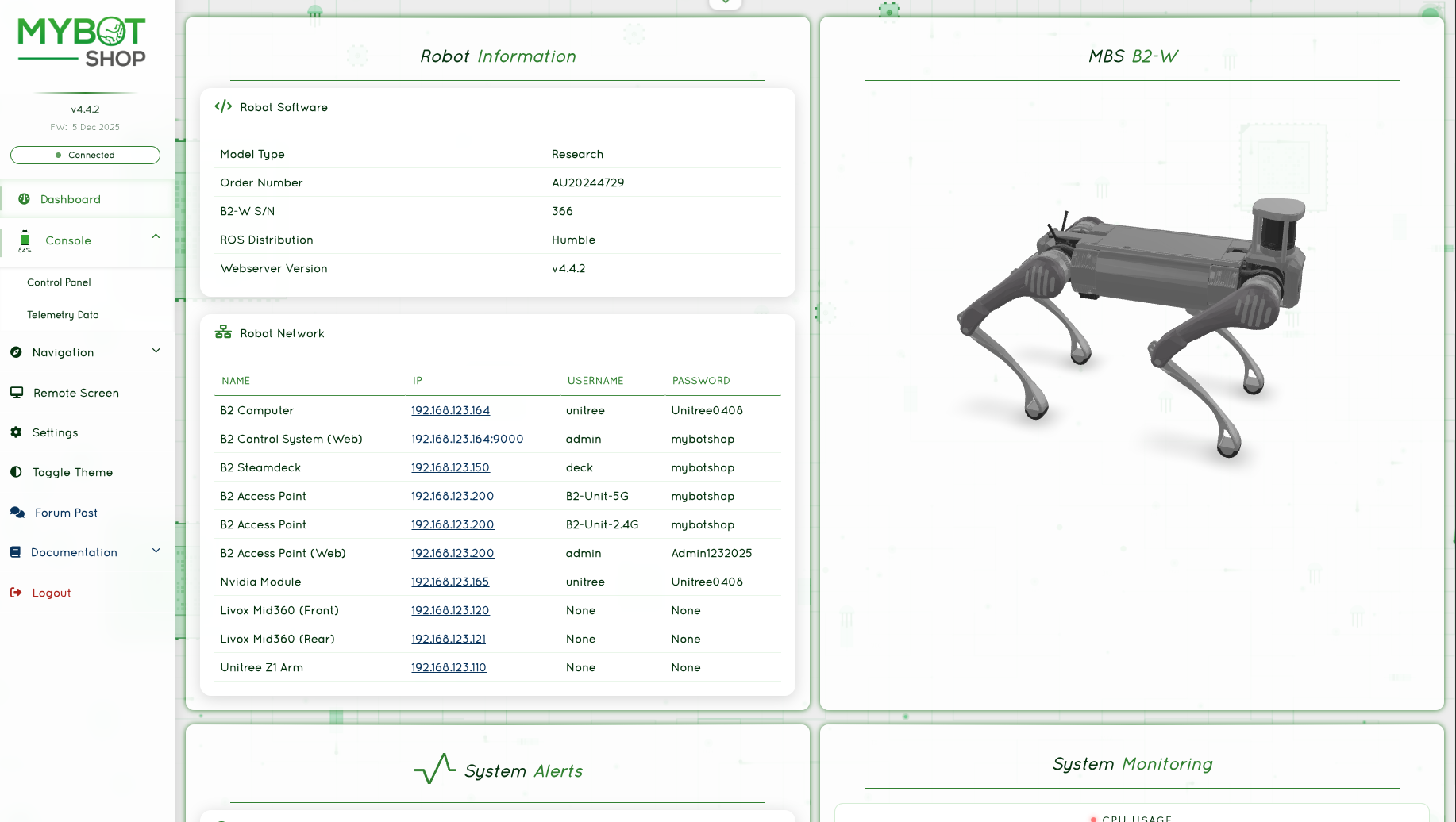
The webserver module comes pre-installed and should be accessible directly at https://192.168.123.164:9000/
or via the WiFi IP to which the robot is connected.
Username: admin
Password: mybotshop
HTTP/HTTPS server with authentication
VNC desktop streaming (1920x1080)
ROS bridge WebSocket interface (port 9090)
GPS waypoint management
Service status monitoring
Rosbag recording
Dynamixel servo control sliders
AI/LLM integration (optional)
View IP Address of the B2W
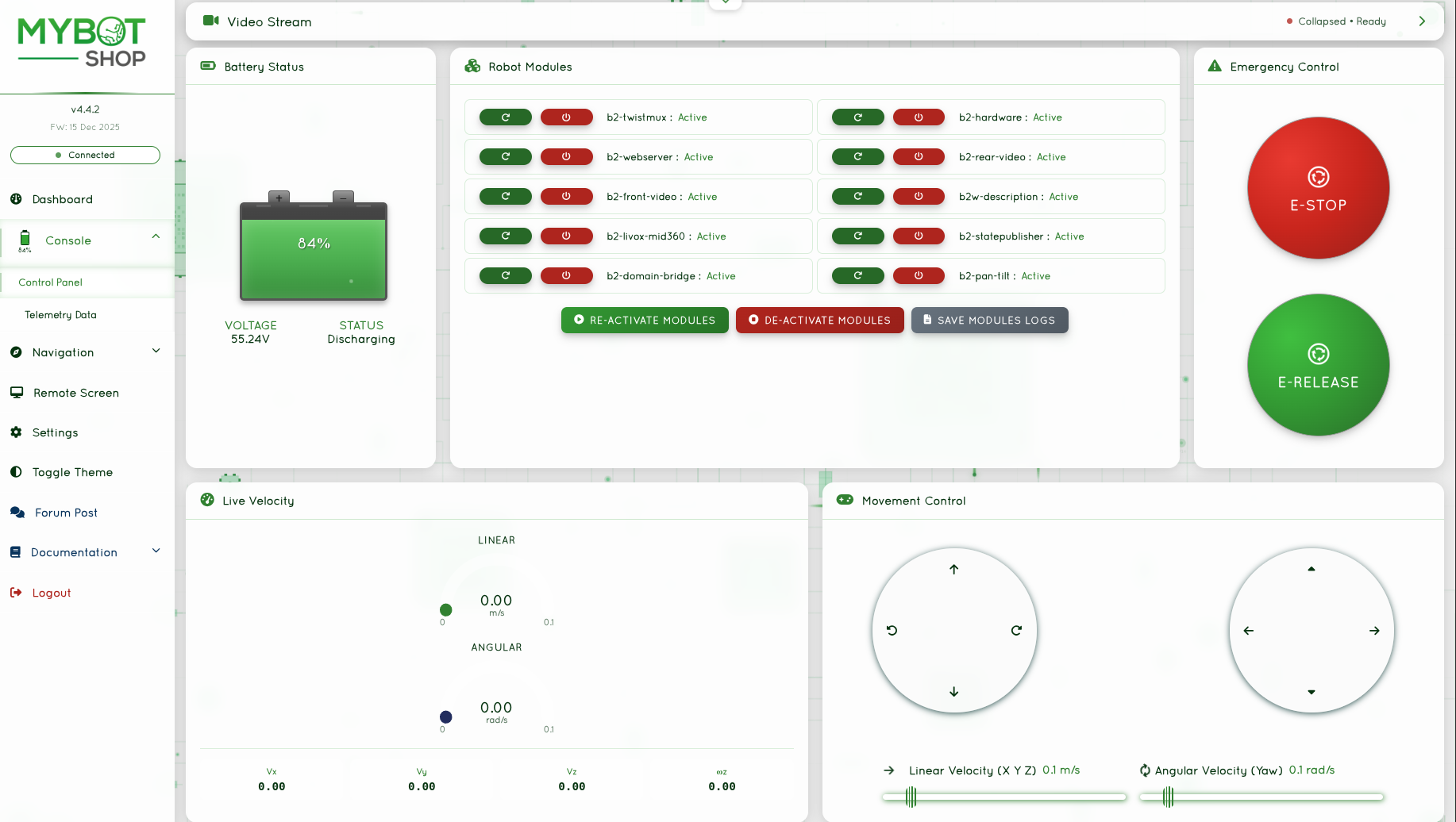
View System load
Enable/Disable the B2W ROS2 Services
Record System logs
Battery status monitoring
Pre-configured action buttons
Web Joystick for teleoperation
Online video stream (front and rear cameras)
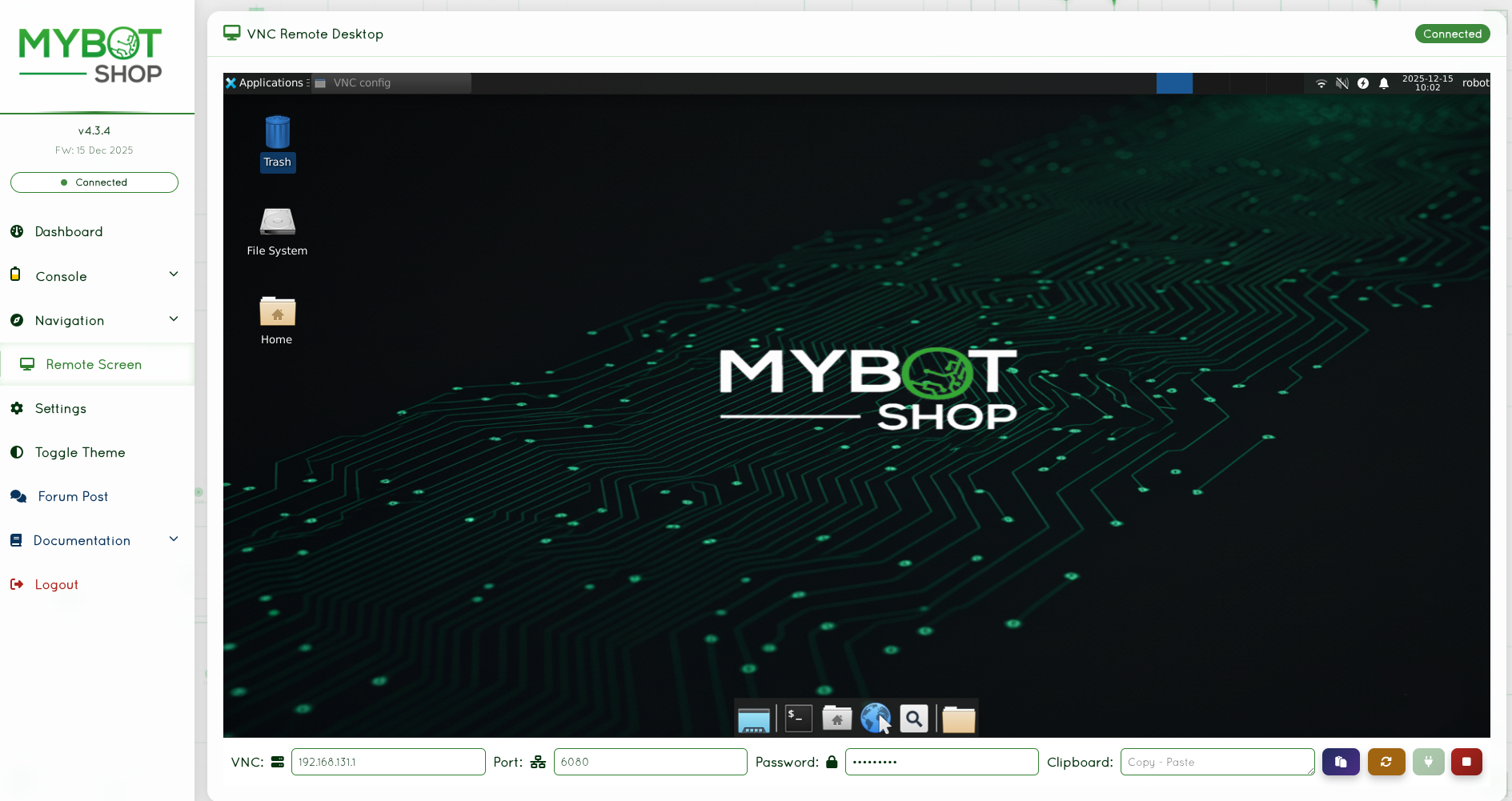
Access on-board screen of the B2W’s computer
VNC password: mybotshop
VNC port: 6080
Web-based terminal access
Command execution interface
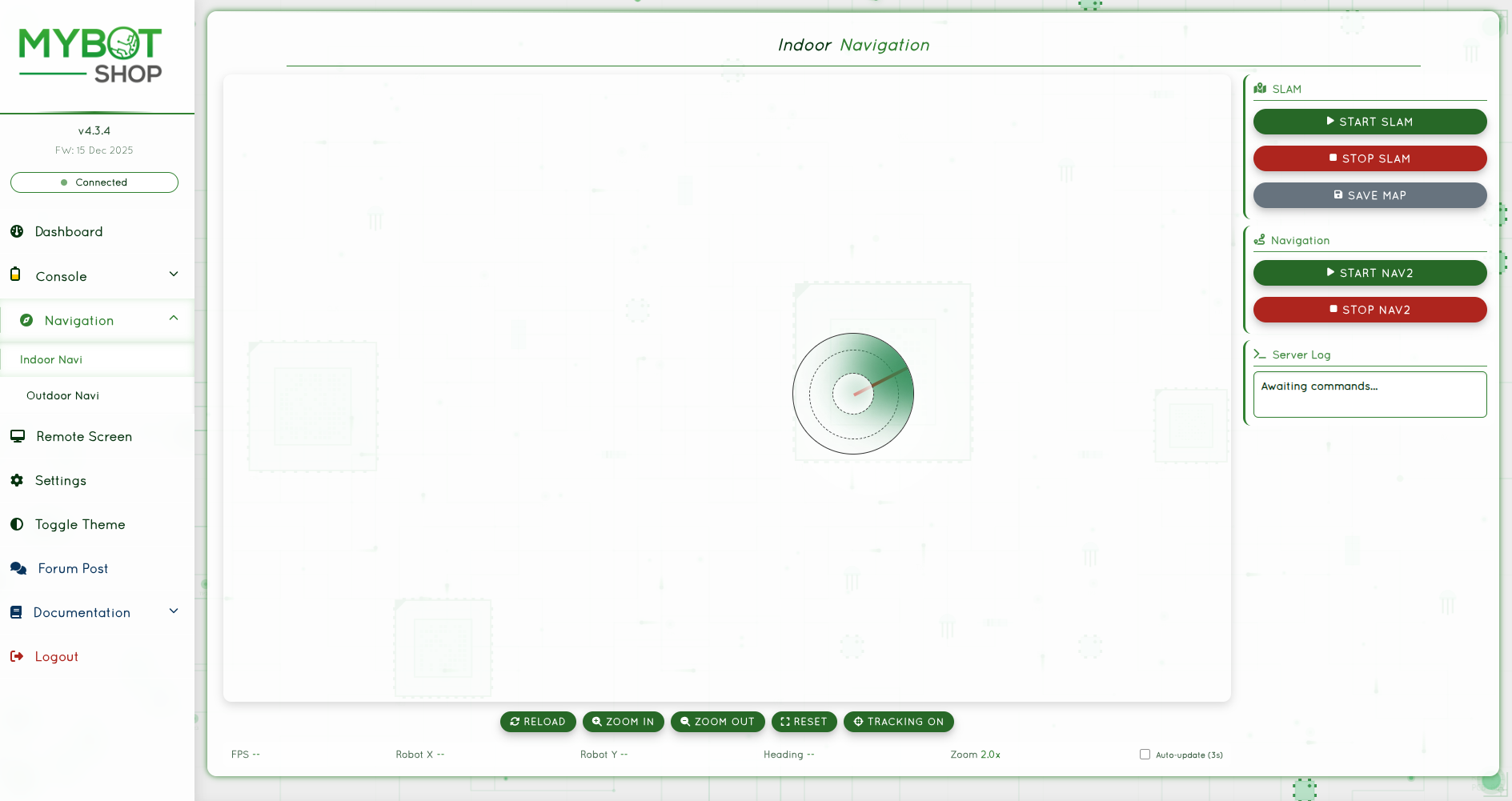
Map visualization and navigation control
Start/Stop SLAM
Save maps
Start/Stop Nav2
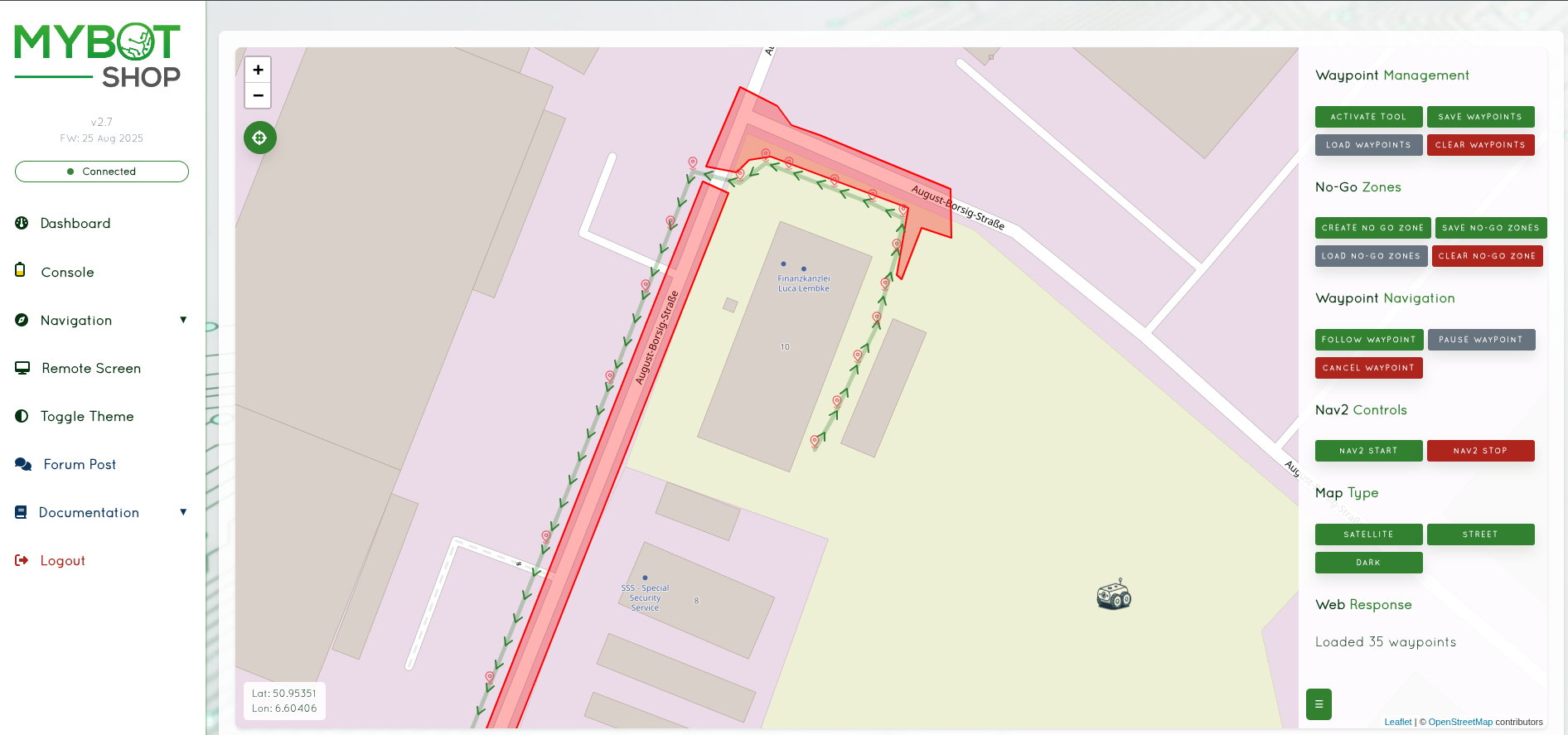
GPS-based outdoor navigation
Waypoint management
No-Go zone configuration
|
|
|
|
Configuration file: b2_webserver/config/robot_webserver.yaml
web_server_ip: "0.0.0.0"
web_server_port: 9000
web_user: "admin"
web_password: "mybotshop"
robot_cmd_vel: "webserver/cmd_vel"
robot_max_linear_velocity: 0.1
robot_max_angular_velocity: 0.1
robot_services:
  - "b2-twistmux"
  - "b2-hardware"
  - "b2-webserver"
  - "b2-rear-video"
  - "b2-front-video"
  - "b2w-description"
  - "b2-livox-mid360"
  - "b2-statepublisher"
  - "b2-domain-bridge"
  - "b2-pan-tilt"
Warning
ROS 2 Foxy Fitzroy reached end-of-life in June 2023. We recommend upgrading to ROS 2 Humble for continued support.
The B2W includes a built-in web interface for remote control and monitoring.
Open a browser and navigate to:
http://192.168.123.164:8080
Camera Streams: Live video feeds from onboard cameras
Joystick Control: Virtual joystick for manual navigation
Mode Selection: Robot mode controls (stand up, sit down, gaits)
Servo Control: Dynamixel pan-tilt camera sliders
Status Display: Real-time robot status information
The webserver is configured via the launch file parameters:
# In b2_webserver/launch/webserver.launch.py
webserver_node = Node(
    package='b2_webserver',
    executable='webserver',
    parameters=[{
        'port': 8080,
        'host': '0.0.0.0',
    }],
)
Cannot access webserver:
Verify the service is running:
systemctl status b2-webserverCheck network connectivity:
ping 192.168.123.164Verify port is open:
ss -tlnp | grep 8080
Teleoperation
Command Line Interface
This requires the installation of the ROS2 Modules on B2. To teleoperate the B2W, run the following command:
ros2 run teleop_twist_keyboard teleop_twist_keyboard \
  cmd_vel:=/b2_unit_001/hardware/cmd_vel
Note
Replace b2_unit_001 with your robot’s namespace. Reduce speed by pressing z until 0.1 for safe indoor operation.
The twist multiplexer arbitrates between multiple velocity command sources:
Source |
Priority |
Timeout |
|---|---|---|
E-Stop Lock |
255 |
None |
Steamdeck Joy |
20 |
0.5s |
Logitech Joy |
15 |
0.5s |
Webserver |
10 |
0.5s |
Interactive Marker |
7 |
0.5s |
External cmd_vel |
5 |
0.5s |
Autonomous High |
3 |
0.5s |
Autonomous Mid |
2 |
0.5s |
Autonomous Low |
1 |
0.5s |
ros2 launch b2_control teleop.launch.py
Configuration file: b2_control/config/teleop_ps4.yaml
The b2_steamdeck package enables wireless teleoperation using a Steam Deck as a portable controller with audio feedback.
Movement (requires L1 held):
Input |
Action |
|---|---|
L1 + Left Stick |
Linear X/Y movement |
L1 + Right Stick X |
Angular rotation |
R1 + Sticks |
Turbo mode (faster speeds) |
Robot Commands:
Button Combo |
Action |
|---|---|
L2 + D-Pad Up |
Stand up |
L2 + D-Pad Down |
Sit down |
Speed Configuration:
Mode |
Linear X |
Linear Y |
Angular |
|---|---|---|---|
Normal |
0.7 m/s |
0.6 m/s |
0.8 rad/s |
Turbo |
1.0 m/s |
1.0 m/s |
0.8 rad/s |
Launch Steam Deck teleop:
ros2 launch b2_steamdeck system.launch.py
Warning
ROS 2 Foxy Fitzroy reached end-of-life in June 2023. We recommend upgrading to ROS 2 Humble for continued support.
The B2W supports multiple teleoperation methods.
The default controller is mapped for Xbox-compatible gamepads:
Input |
Action |
|---|---|
Left Stick |
Linear velocity (forward/backward, strafe) |
Right Stick |
Angular velocity (rotation) |
A Button |
Stand up |
B Button |
Sit down |
X Button |
Recovery mode |
Y Button |
Toggle gait mode |
Launch teleop node:
ros2 launch b2_bringup teleop.launch.py
For keyboard teleoperation:
ros2 run teleop_twist_keyboard teleop_twist_keyboard \
  --ros-args --remap cmd_vel:=/b2_unit_001/cmd_vel
Use the built-in webserver joystick at:
http://192.168.123.164:8080
The B2W accepts standard Twist messages:
ros2 topic pub /b2_unit_001/cmd_vel geometry_msgs/msg/Twist \
  "{linear: {x: 0.5, y: 0.0, z: 0.0}, angular: {x: 0.0, y: 0.0, z: 0.3}}"
Visualization
RViz2 Visualization
To visualize the robot state in RViz2:
ros2 launch b2_viz view_robot.launch.py
Standard B2 (legged):
export B2_DESC=1
ros2 launch b2_description b2_description.launch.py
Wheeled B2W:
ros2 launch b2_description b2w_description.launch.py
export B2_DESC=1
ros2 run xacro xacro \
  /opt/mybotshop/src/mybotshop/b2_description/xacro/robot.xacro \
  > /opt/mybotshop/src/mybotshop/b2_description/xacro/b2.urdf
To debug the TF tree:
ros2 run rqt_gui rqt_gui --ros-args \
  --remap tf:=/b2_unit_001/tf \
  tf_static:=/b2_unit_001/tf_static
To view the robot’s URDF model:
ros2 launch b2_description b2w_description.launch.py
Warning
ROS 2 Foxy Fitzroy reached end-of-life in June 2023. We recommend upgrading to ROS 2 Humble for continued support.
Launch the visualization tools for the B2W.
View the robot URDF model:
ros2 launch b2_description display.launch.py
With Z1 arm enabled:
export B2_Z1=1
ros2 launch b2_description display.launch.py
Launch complete visualization with sensor data:
ros2 launch b2_bringup rviz.launch.py
The default RViz configuration includes:
Robot model visualization
TF tree display
LaserScan from LiDAR
PointCloud2 visualization
Camera image displays
Odometry arrows
Path visualization
Custom configurations are stored in:
b2_bringup/rviz/
View the transform tree:
ros2 run tf2_tools view_frames

# Or real-time in terminal
ros2 run tf2_ros tf2_echo base_link odom
Rigs
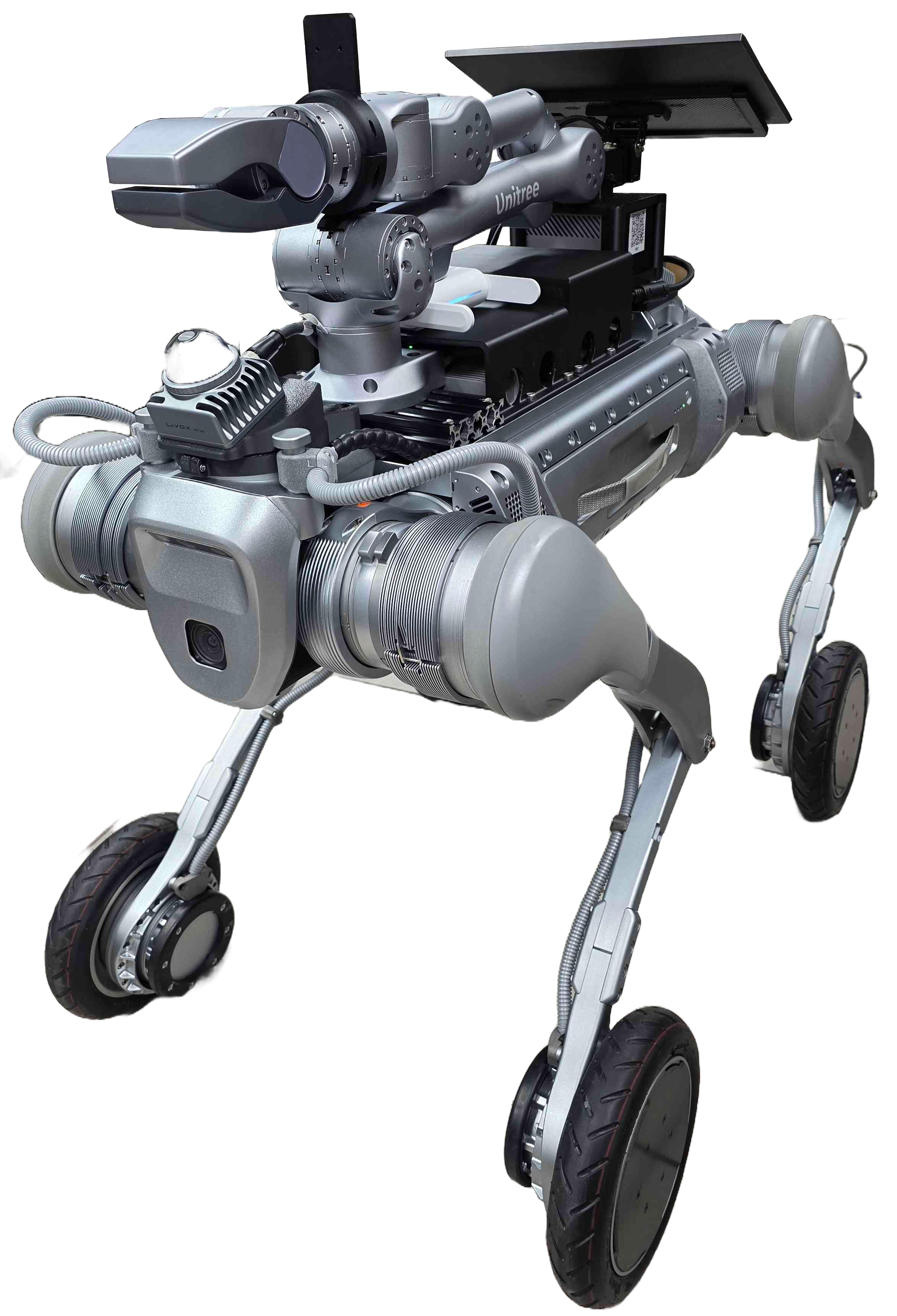
The B2-W features specialized wheeled feet, combining speed, adaptability, and cutting-edge design. Engineered to navigate various terrains and tackle complex tasks with ease, it pushes the boundaries of robotic mobility, offering enhanced efficiency and versatility in motion.
Maximum speed: 50rad/s wheel velocity
Weight (With Battery): About 85kg
Standing Height: 758mm
Folded Height: 450mm
The B2W can switch between various gaits suitable for wheeled locomotion:
# Set trotting gait for wheel movement
ros2 service call /b2_unit_001/hardware/modes \
  b2_interface/srv/B2Modes "{request_data: 'gait_trot'}"

# Set flat terrain walking mode
ros2 service call /b2_unit_001/hardware/modes \
  b2_interface/srv/B2Modes "{request_data: 'gait_flatwalk'}"
The B2-W supports various payload configurations:
Maximum Standing Load: About 40kg
Continuous Walking Load: About 120kg
Additional hardware can be mounted on the robot’s back including:
Unitree Z1 robotic arm
Pan-tilt camera systems
Sensor arrays
Custom payloads
The default rig configuration includes a pan-tilt camera system controlled via Dynamixel servos.
Servo Configuration:
Servo 0 (Pan): Range 1150-3200, Default 2170
Servo 1 (Tilt): Range 230-900, Default 565
Control via webserver sliders or ROS2 topics:
# Center pan servo
ros2 topic pub --once /dynamixel/servo_0/command \
  std_msgs/msg/Float64 "data: 2170"

# Center tilt servo
ros2 topic pub --once /dynamixel/servo_1/command \
  std_msgs/msg/Float64 "data: 565"
Warning
ROS 2 Foxy Fitzroy reached end-of-life in June 2023. We recommend upgrading to ROS 2 Humble for continued support.
The B2-W features specialized wheeled feet, combining speed, adaptability, and cutting-edge design.
Maximum speed: 50rad/s wheel velocity
Weight (With Battery): About 85kg
Standing Height: 758mm
Folded Height: 450mm
The B2W can switch between various gaits suitable for wheeled locomotion:
# Set trotting gait for wheel movement
ros2 service call /b2_unit_001/hardware/modes \
  b2_interface/srv/B2Modes "{request_data: 'gait_trot'}"

# Set flat terrain walking mode
ros2 service call /b2_unit_001/hardware/modes \
  b2_interface/srv/B2Modes "{request_data: 'gait_flatwalk'}"
The B2-W supports various payload configurations:
Maximum Standing Load: About 40kg
Continuous Walking Load: About 120kg
Additional hardware can be mounted including:
Unitree Z1 robotic arm
Pan-tilt camera systems
Sensor arrays
Custom payloads
The default rig configuration includes a pan-tilt camera system controlled via Dynamixel servos.
Servo Configuration:
Servo 0 (Pan): Range 1150-3200, Default 2170
Servo 1 (Tilt): Range 230-900, Default 565
Control via webserver sliders or ROS 2 topics:
# Center pan servo
ros2 topic pub --once /dynamixel/servo_0/command \
  std_msgs/msg/Float64 "data: 2170"

# Center tilt servo
ros2 topic pub --once /dynamixel/servo_1/command \
  std_msgs/msg/Float64 "data: 565"
Manipulation
Important
EXPERIMENTAL: The Z1 driver is under active development.
If your B2W is equipped with the Unitree Z1 arm:
Enable the arm:
ros2 service call /b2_unit_001/z1/enable std_srvs/srv/Trigger
Send trajectory command:
ros2 topic pub --once /b2_unit_001/z1/joint_trajectory \
  trajectory_msgs/msg/JointTrajectory "{
    joint_names: ['joint1', 'joint2', 'joint3',
      'joint4', 'joint5', 'joint6', 'jointGripper'],
    points: [{
      positions: [0.0, 1.57, -1.57, 0.0, 0.0, 0.0, 0.0],
      time_from_start: {sec: 3, nanosec: 0}
    }]
  }"
Disable the arm:
ros2 service call /b2_unit_001/z1/disable std_srvs/srv/Trigger
Name |
Type |
Description |
|---|---|---|
z1/joint_states |
sensor_msgs/JointState |
Joint positions, velocities, efforts |
z1/joint_trajectory |
trajectory_msgs/JointTrajectory |
Trajectory commands |
z1/enable |
std_srvs/Trigger |
Enable arm control |
z1/disable |
std_srvs/Trigger |
Disable arm |
For detailed Z1 arm specifications, refer to the Unitree Z1 documentation.
Enable Z1 in the robot description:
export B2_Z1=1
ros2 launch b2_description display.launch.py
Warning
ROS 2 Foxy Fitzroy reached end-of-life in June 2023. We recommend upgrading to ROS 2 Humble for continued support.
Important
EXPERIMENTAL: The Z1 driver is under active development.
If your B2W is equipped with the Unitree Z1 arm:
Enable the arm:
ros2 service call /b2_unit_001/z1/enable std_srvs/srv/Trigger
Send trajectory command:
ros2 topic pub --once /b2_unit_001/z1/joint_trajectory \
  trajectory_msgs/msg/JointTrajectory "{
    joint_names: ['joint1', 'joint2', 'joint3',
      'joint4', 'joint5', 'joint6', 'jointGripper'],
    points: [{
      positions: [0.0, 1.57, -1.57, 0.0, 0.0, 0.0, 0.0],
      time_from_start: {sec: 3, nanosec: 0}
    }]
  }"
Disable the arm:
ros2 service call /b2_unit_001/z1/disable std_srvs/srv/Trigger
Name |
Type |
Description |
|---|---|---|
z1/joint_states |
sensor_msgs/JointState |
Joint positions, velocities, efforts |
z1/joint_trajectory |
trajectory_msgs/JointTrajectory |
Trajectory commands |
z1/enable |
std_srvs/Trigger |
Enable arm control |
z1/disable |
std_srvs/Trigger |
Disable arm |
Enable Z1 in the robot description:
export B2_Z1=1
ros2 launch b2_description display.launch.py
Navigation
The B2W uses the Nav2 navigation stack for autonomous navigation.
Run SLAM to create a 2D occupancy grid map using the LiDAR sensor:
ros2 launch b2_nav2 slam.launch.py
Drive the robot slowly (recommended 0.2 m/s) using the joystick controller or keyboard teleop to build the map:
ros2 run teleop_twist_keyboard teleop_twist_keyboard \
  cmd_vel:=/b2_unit_001/controls/cmd_vel
Once satisfied with the map, save it using:
ros2 run nav2_map_server map_saver_cli -f \
  /opt/mybotshop/src/mybotshop/b2_nav2/maps/custom_map \
  --ros-args --remap map:=/b2_unit_001/map
Note
Replace b2_unit_001 with your robot’s namespace. Maps are saved to the b2_nav2/maps/ directory. After saving, rebuild the workspace with colcon build --symlink-install so the new map can be found.
SLAM Configuration:
Configuration file: b2_nav2/param/nav2_slam.yaml
slam_toolbox:
  ros__parameters:
    solver_plugin: solver_plugins::CeresSolver
    resolution: 0.05
    max_laser_range: 40.0
    mode: mapping
Run odometry-based navigation without a pre-built map. This mode navigates in the global map frame using only odometry for localization:
ros2 launch b2_nav2 odom_navi.launch.py
This is useful for relative navigation where you don’t have a map of the environment yet.
Use a pre-built 2D map for autonomous navigation with AMCL localization:
ros2 launch b2_nav2 map_navi.launch.py
This launches the full Nav2 stack including:
Map Server - loads pre-built occupancy grid maps
AMCL - Adaptive Monte Carlo Localization
Controller Server - path following (DWB controller)
Planner Server - global path planning (NavFn)
Behavior Server - recovery behaviors
Waypoint Follower - for multi-point navigation
For outdoor GPS-based navigation:
ros2 launch b2_nav2 gps_navi.launch.py
Launch File |
Description |
|---|---|
slam.launch.py |
2D SLAM mapping mode |
odom_navi.launch.py |
Odometric navigation (no map) |
map_navi.launch.py |
Full autonomous navigation with map |
gps_navi.launch.py |
GPS-based outdoor navigation |
Warning
ROS 2 Foxy Fitzroy reached end-of-life in June 2023. We recommend upgrading to ROS 2 Humble for continued support.
The B2W supports autonomous navigation using Nav2.
Create a map using SLAM:
ros2 launch b2_navigation slam.launch.py
Save the map when complete:
ros2 run nav2_map_server map_saver_cli -f ~/maps/my_map
Localize on a saved map:
ros2 launch b2_navigation localization.launch.py \
  map:=~/maps/my_map.yaml
Launch full navigation stack:
ros2 launch b2_navigation navigation.launch.py \
  map:=~/maps/my_map.yaml
Via RViz2:
Use the “2D Goal Pose” tool to send navigation goals.
Via Command Line:
ros2 action send_goal /navigate_to_pose \
  nav2_msgs/action/NavigateToPose \
  "{pose: {header: {frame_id: 'map'}, pose: {position: {x: 1.0, y: 2.0, z: 0.0}, orientation: {w: 1.0}}}}"
The B2W provides multiple odometry sources:
/b2_unit_001/odom- Leg odometry/b2_unit_001/odom_imu- IMU-fused odometry/odometry/filtered- EKF filtered odometry (if configured)
Sensors
The B2W is equipped with dual Livox Mid360 LiDAR sensors for 3D perception.
Network Configuration:
Sensor |
IP Address |
|---|---|
Livox Mid360 (Front) |
192.168.123.120 |
Livox Mid360 (Rear) |
192.168.123.121 |
Launch Options:
# Launch both LiDARs
ros2 launch b2_lidars livox_mid360.launch.py lidar_position:=both

# Launch front only
ros2 launch b2_lidars livox_mid360.launch.py lidar_position:=front

# Launch rear only
ros2 launch b2_lidars livox_mid360.launch.py lidar_position:=rear
Launch Arguments:
Argument |
Default |
Description |
|---|---|---|
lidar_position |
both |
front, rear, or both |
xfer_format |
0 |
Data transfer format |
publish_freq |
10.0 |
Publishing frequency (Hz) |
namespace |
Topic namespace |
Published Topics:
Topic |
Type |
|---|---|
livox/front/lidar |
sensor_msgs/PointCloud2 |
livox/rear/lidar |
sensor_msgs/PointCloud2 |
livox/front/imu |
sensor_msgs/Imu |
livox/rear/imu |
sensor_msgs/Imu |
scan |
sensor_msgs/LaserScan |
The B2W can be equipped with Intel RealSense D435i depth cameras.
For RealSense documentation, see: https://github.com/IntelRealSense/realsense-ros
The b2_dynamixel package controls Dynamixel servos for pan-tilt mechanisms using Protocol 2.0.
Hardware Setup:
Supported Servos: XM, XH, XC, XL430, XW series
Interface: U2D2 USB adapter
Serial Port:
/dev/b2/dynamixelBaud Rate: 57600
Configuration:
Configuration file: b2_dynamixel/config/dynamixel.yaml
dynamixel_driver:
  ros__parameters:
    port: '/dev/b2/dynamixel'
    baudrate: 57600
    servo_ids: [0, 1]
    position_min: [1150, 230]
    position_max: [3200, 900]
    profile_velocity: 100
    profile_acceleration: 50
    publish_rate: 20.0
    position_topic_prefix: 'dynamixel/servo'
    feedback_topic: 'dynamixel/joint_states'
Topics and Services:
Topic/Service |
Type |
Description |
|---|---|---|
dynamixel/servo_0/command |
Float64 |
Pan (1150-3200) |
dynamixel/servo_1/command |
Float64 |
Tilt (230-900) |
dynamixel/joint_states |
JointState |
Positions (rad) |
dynamixel/reboot |
Trigger |
Clear errors |
Usage:
# Launch driver
ros2 launch b2_dynamixel dynamixel.launch.py

# Center pan servo (default: 2170)
ros2 topic pub --once /dynamixel/servo_0/command \
  std_msgs/msg/Float64 "data: 2170"

# Center tilt servo (default: 565)
ros2 topic pub --once /dynamixel/servo_1/command \
  std_msgs/msg/Float64 "data: 565"

# Read joint states
ros2 topic echo /dynamixel/joint_states

# Reboot servos (clear hardware errors)
ros2 service call /dynamixel/reboot std_srvs/srv/Trigger
Udev Rules:
To create persistent device symlinks:
echo 'SUBSYSTEM=="tty", ATTRS{idVendor}=="0403", \
  ATTRS{idProduct}=="6014", SYMLINK+="b2/dynamixel", \
  MODE="0666"' | sudo tee /etc/udev/rules.d/99-dynamixel.rules
sudo udevadm control --reload-rules
sudo udevadm trigger
Important
EXPERIMENTAL: The Z1 driver is under active development.
The b2_z1 package provides a ROS 2 driver for the Unitree Z1 robotic arm.
Quick Start:
# Launch the driver
ros2 launch b2_z1 z1.launch.py

# Enable the arm (required before sending commands)
ros2 service call /b2_unit_001/z1/enable std_srvs/srv/Trigger

# Send trajectory command
ros2 topic pub --once /b2_unit_001/z1/joint_trajectory \
  trajectory_msgs/msg/JointTrajectory "{
    joint_names: ['joint1', 'joint2', 'joint3',
      'joint4', 'joint5', 'joint6', 'jointGripper'],
    points: [{
      positions: [0.0, 1.57, -1.57, 0.0, 0.0, 0.0, 0.0],
      time_from_start: {sec: 3, nanosec: 0}
    }]
  }"

# Disable the arm
ros2 service call /b2_unit_001/z1/disable std_srvs/srv/Trigger
Topics and Services:
Name |
Type |
Description |
|---|---|---|
z1/joint_states |
sensor_msgs/JointState |
Joint positions |
z1/joint_trajectory |
trajectory_msgs/JointTrajectory |
Commands |
z1/enable |
std_srvs/Trigger |
Enable arm |
z1/disable |
std_srvs/Trigger |
Disable arm |
URDF Integration:
Enable Z1 in the robot description:
export B2_Z1=1
ros2 launch b2_description display.launch.py
Warning
ROS 2 Foxy Fitzroy reached end-of-life in June 2023. We recommend upgrading to ROS 2 Humble for continued support.
The B2W platform includes multiple sensor systems.
The robot is equipped with front and rear Livox Mid360 LiDAR units.
Network Configuration:
Front LiDAR: 192.168.123.120
Rear LiDAR: 192.168.123.121
Topics:
Topic |
Type |
|---|---|
/livox/front/lidar |
sensor_msgs/PointCloud2 |
/livox/rear/lidar |
sensor_msgs/PointCloud2 |
/livox/front/imu |
sensor_msgs/Imu |
/livox/rear/imu |
sensor_msgs/Imu |
Depth camera for close-range perception.
Topics:
Topic |
Type |
|---|---|
/camera/color/image_raw |
sensor_msgs/Image |
/camera/depth/image_rect_raw |
sensor_msgs/Image |
/camera/depth/color/points |
sensor_msgs/PointCloud2 |
/camera/imu |
sensor_msgs/Imu |
Launch camera node:
ros2 launch realsense2_camera rs_launch.py
Pan-tilt camera mount using Dynamixel servos.
Configuration:
Servo 0 (Pan): Range 1150-3200, Default 2170
Servo 1 (Tilt): Range 230-900, Default 565
Control Topics:
# Set pan position
ros2 topic pub --once /dynamixel/servo_0/command \
  std_msgs/msg/Float64 "data: 2170"

# Set tilt position
ros2 topic pub --once /dynamixel/servo_1/command \
  std_msgs/msg/Float64 "data: 565"
Joint States:
ros2 topic echo /b2_unit_001/joint_states
IMU Data:
ros2 topic echo /b2_unit_001/imu
Simulation

The B2W simulation package uses ROS2 Humble with Gazebo Fortress, featuring the complete B2W platform with wheeled quadruped locomotion.
ROS 2 Humble
Gazebo Fortress
gz_ros2_control
ros2 launch b2_gazebo b2_fortress_simulation.launch.py
ros2 launch b2_gazebo b2w_fortress_simulation.launch.py
To kill Gazebo zombie processes:
ros2 run b2_gazebo kill_gz.sh
Configure the simulation using environment variables before launch:
Variable |
Default |
Description |
|---|---|---|
B2_DESC |
1 |
Enable B2 robot description |
B2_Z1 |
0 |
Include Z1 robotic arm |
To visualize the robot in RViz2:
ros2 launch b2_viz view_robot.launch.py
To teleoperate the B2W using your keyboard:
ros2 run teleop_twist_keyboard teleop_twist_keyboard \
  cmd_vel:=/b2_unit_001/hardware/cmd_vel
Note
Reduce speed by pressing z until 0.1 for safe indoor operation.
ros2 action send_goal \
  /joint_effort_controller/follow_joint_trajectory \
  control_msgs/action/FollowJointTrajectory -f "{
    trajectory: {
      joint_names: [
        'FL_hip_joint', 'FL_thigh_joint', 'FL_calf_joint',
        'FR_hip_joint', 'FR_thigh_joint', 'FR_calf_joint',
        'RL_hip_joint', 'RL_thigh_joint', 'RL_calf_joint',
        'RR_hip_joint', 'RR_thigh_joint', 'RR_calf_joint'
      ],
      points: [{
        positions: [0.0, 0.9, -1.5, 0.0, 0.9, -1.5,
          0.0, 0.9, -1.5, 0.0, 0.9, -1.5],
        time_from_start: {sec: 2, nanosec: 0}
      }]
    }
  }"
# Forward
ros2 topic pub /velocity_controller/commands \
  std_msgs/msg/Float64MultiArray \
  "{data: [-1.0, -1.0, -1.0, -1.0]}"

# Backward
ros2 topic pub /velocity_controller/commands \
  std_msgs/msg/Float64MultiArray \
  "{data: [1.0, 1.0, 1.0, 1.0]}"

# Stop
ros2 topic pub /velocity_controller/commands \
  std_msgs/msg/Float64MultiArray \
  "{data: [0.0, 0.0, 0.0, 0.0]}"
If controllers are not starting, manually activate them:
ros2 control set_controller_state \
  -c /b2_unit_001/controller_manager \
  joint_state_broadcaster configure

ros2 control set_controller_state \
  -c /b2_unit_001/controller_manager \
  joint_state_broadcaster activate
Check hardware interfaces:
ros2 control list_hardware_interfaces \
  -c /b2_unit_001/controller_manager
Warning
ROS 2 Foxy Fitzroy reached end-of-life in June 2023. We recommend upgrading to ROS 2 Humble for continued support.
The B2W can be simulated using Gazebo.
Note
ROS 2 Foxy uses Gazebo 11 (classic). For Ignition Gazebo Fortress, please use ROS 2 Humble.
Launch the B2W in Gazebo 11:
ros2 launch b2_gazebo spawn.launch.py
With Z1 arm:
export B2_Z1=1
ros2 launch b2_gazebo spawn.launch.py
Specify a custom world:
ros2 launch b2_gazebo spawn.launch.py \
  world:=warehouse.world
The simulated robot responds to the same topics as the real hardware:
# Velocity commands
ros2 topic pub /b2_unit_001/cmd_vel geometry_msgs/msg/Twist \
  "{linear: {x: 0.5, y: 0.0, z: 0.0}, angular: {x: 0.0, y: 0.0, z: 0.0}}"

# Mode commands
ros2 service call /b2_unit_001/hardware/modes \
  b2_interface/srv/B2Modes "{request_data: 'stand_up'}"
Simulated sensors publish to the same topics as the real robot:
LiDAR point clouds
Camera images
IMU data
Joint states
Packages
The QRE B2W workspace is organized into two main categories: mybotshop (custom MBS packages) and third_party (external dependencies).
Located under: /opt/mybotshop/src/mybotshop/
Package |
Version |
Description |
|---|---|---|
b2_platform |
1.0.0 |
Unitree SDK hardware interface, odometry, video streaming |
b2_interface |
1.0.0 |
Custom ROS 2 services (B2Modes.srv, B2Light.srv) |
b2_dynamixel |
1.0.0 |
Dynamixel servo control for pan-tilt mechanism |
b2_bringup |
1.0.0 |
System startup and service installer |
b2_description |
1.0.0 |
URDF/Xacro robot descriptions |
b2_z1 |
1.0.0 |
Unitree Z1 arm driver |
Package |
Version |
Description |
|---|---|---|
b2_lidars |
1.2.0 |
Livox Mid360 dual-LiDAR integration |
b2_depth_camera |
1.2.0 |
RealSense D435i depth camera |
b2_usbcam |
1.2.0 |
USB camera streaming |
b2_gps |
1.2.0 |
GPS/GNSS integration (Fixposition, Drotek) |
b2_vision_action |
1.0.0 |
Computer vision and object detection |
Package |
Version |
Description |
|---|---|---|
b2_control |
1.2.0 |
Twist mux, teleop, EKF localization |
b2_nav2 |
1.0.0 |
Nav2 navigation stack, SLAM |
b2_webserver |
2.0.0 |
Web-based remote operation interface |
b2_viz |
1.0.0 |
RViz visualization configurations |
b2_gazebo |
1.0.0 |
Gazebo Fortress simulation |
b2_steamdeck |
1.0.0 |
Steam Deck wireless teleoperation |
The b2_platform package provides ROS 2 integration with the Unitree SDK 2.0.
Key Launch Files:
hardware.launch.py- Main hardware controlstate_publisher.launch.py- Robot state publishingfront_video.launch.py- Front camera streamingrear_video.launch.py- Rear camera streamingbridge.launch.py- ROS domain bridging
Configuration:
Configuration file: b2_platform/config/b2_platform.yaml
robot_odom_topic: "platform/odom"
robot_odom_publisher_on: true
transform_odom_frame: "odom"
transform_base_frame: "base_link"
front_camera_port: 1720
rear_camera_port: 1721
Custom ROS2 message and service definitions for B2W packages.
Key Services:
B2Modes.srv- Robot mode control (stand_up, stand_down, gaits, etc.)B2Light.srv- LED light control
Control system package for robot base. Provides twist mux, teleop configuration, and EKF localization.
Key Launch Files:
twistmux.launch.py- Twist mux configurationcontrol.launch.py- Full control stackteleop.launch.py- Teleop configurationekf_localization.launch.py- EKF localization
EKF Localization:
ros2 launch b2_control ekf_localization.launch.py
Configuration file: b2_control/config/localization.yaml
Warning
ROS 2 Foxy Fitzroy reached end-of-life in June 2023. We recommend upgrading to ROS 2 Humble for continued support.
Overview of the B2W ROS 2 packages.
Package |
Description |
|---|---|
b2_driver |
Hardware interface to Unitree B2 SDK |
b2_interface |
Custom message and service definitions |
b2_description |
URDF/Xacro robot description |
b2_bringup |
Launch files and configuration |
Package |
Description |
|---|---|
livox_ros_driver2 |
Livox Mid360 LiDAR driver |
realsense2_camera |
Intel RealSense camera driver |
dynamixel_driver |
Dynamixel servo control |
Package |
Description |
|---|---|
b2_navigation |
Nav2 configuration and launch files |
b2_slam |
SLAM configuration |
b2_interface/srv/B2Modes:
string request_data
---
bool success
string message
Common mode values:
stand_up,stand_down,damp,recoverygait_idle,gait_trot,gait_flatwalkspeed_low,speed_highbody_height_low,body_height_mid,body_height_high
Debugging
This section covers debugging tools and techniques for the B2W ROS2 system.
# Verify ROS_DOMAIN_ID
echo $ROS_DOMAIN_ID  # Should be 10

# Check network
ping 192.168.123.165
# Check USB device
ls -la /dev/b2/dynamixel

# Reboot servos
ros2 service call /dynamixel/reboot std_srvs/srv/Trigger
# Verify network
ping 192.168.123.120  # Front
ping 192.168.123.121  # Rear
# Check what environment the service sees
sudo systemctl show b2-hardware \
  --property=Environment

# Verify startup.bash sources correctly
cat /opt/mybotshop/src/mybotshop/b2_bringup/config/setup.bash
Warning
Do not run duplicate nodes! If a service is running (e.g., b2-hardware is active), the corresponding launch file is already running. Manually launching the same file will create duplicate nodes, causing conflicts.
Check Before Manual Launch:
Always run this before manually launching any ROS2 nodes:
# Quick check - shows all active b2 services
systemctl list-units --type=service --state=active | grep b2

# Or check specific service
systemctl is-active b2-hardware && \
  echo "SERVICE RUNNING - DO NOT LAUNCH MANUALLY"
If you accidentally ran duplicate nodes:
# Kill all ROS2 nodes in namespace
pkill -f "ros2.*b2_unit_001"

# Restart the service
sudo systemctl restart b2-hardware
Red marker - The startup job has failed
Green marker - Everything is working correctly
Grey marker - The service has not started yet
# Restart B2 services
sudo systemctl restart b2-hardware
sudo systemctl restart b2-webserver
# View recent logs for a service
journalctl -u b2-hardware -n 50

# Follow logs in real-time
journalctl -u b2-webserver -f

# View logs since last boot
journalctl -u b2-hardware -b
Warning
ROS 2 Foxy Fitzroy reached end-of-life in June 2023. We recommend upgrading to ROS 2 Humble for continued support.
This section covers debugging tools and techniques for the B2W ROS 2 system.
# Verify ROS_DOMAIN_ID
echo $ROS_DOMAIN_ID  # Should be 10

# Check network
ping 192.168.123.165
# Check USB device
ls -la /dev/b2/dynamixel

# Reboot servos
ros2 service call /dynamixel/reboot std_srvs/srv/Trigger
# Verify network
ping 192.168.123.120  # Front
ping 192.168.123.121  # Rear
# Check what environment the service sees
sudo systemctl show b2-hardware --property=Environment

# Verify startup.bash sources correctly
cat /opt/mybotshop/src/mybotshop/b2_bringup/config/setup.bash
Warning
Do not run duplicate nodes! If a service is running (e.g., b2-hardware is active), the corresponding launch file is already running.
Check Before Manual Launch:
# Quick check - shows all active b2 services
systemctl list-units --type=service --state=active | grep b2

# Or check specific service
systemctl is-active b2-hardware && \
  echo "SERVICE RUNNING - DO NOT LAUNCH MANUALLY"
If you accidentally ran duplicate nodes:
# Kill all ROS2 nodes in namespace
pkill -f "ros2.*b2_unit_001"

# Restart the service
sudo systemctl restart b2-hardware
sudo systemctl restart b2-hardware
sudo systemctl restart b2-webserver
# View recent logs
journalctl -u b2-hardware -n 50

# Follow logs in real-time
journalctl -u b2-webserver -f
Miscellanious
The B2W supports various operational modes controlled via ROS 2 services.
Available Modes:
Mode |
Description |
|---|---|
damp |
Damping mode (safe state) |
stand_up |
Stand up from lying position |
stand_down |
Lie down safely |
recovery |
Recovery mode for fault conditions |
stop_move |
Stop all movement |
gait_idle |
Idle gait (standing) |
gait_trot |
Trotting gait |
gait_trot_running |
Running trot gait |
gait_visualwalk |
Visual walking mode |
gait_flatwalk |
Flat terrain walking |
speed_low / speed_high |
Speed settings |
body_height_low/mid/high |
Body height settings |
Mode Control Examples:
# Stand up
ros2 service call /b2_unit_001/hardware/modes \
  b2_interface/srv/B2Modes "{request_data: 'stand_up'}"

# Stand down (safe shutdown position)
ros2 service call /b2_unit_001/hardware/modes \
  b2_interface/srv/B2Modes "{request_data: 'stand_down'}"

# Enter damping mode
ros2 service call /b2_unit_001/hardware/modes \
  b2_interface/srv/B2Modes "{request_data: 'damp'}"

# Set trotting gait
ros2 service call /b2_unit_001/hardware/modes \
  b2_interface/srv/B2Modes "{request_data: 'gait_trot'}"

# Recovery mode
ros2 service call /b2_unit_001/hardware/modes \
  b2_interface/srv/B2Modes "{request_data: 'recovery'}"
Speed Settings:
# Set low speed
ros2 service call /b2_unit_001/hardware/modes \
  b2_interface/srv/B2Modes "{request_data: 'speed_low'}"

# Set high speed
ros2 service call /b2_unit_001/hardware/modes \
  b2_interface/srv/B2Modes "{request_data: 'speed_high'}"
Body Height Settings:
# Low body height
ros2 service call /b2_unit_001/hardware/modes \
  b2_interface/srv/B2Modes "{request_data: 'body_height_low'}"

# Medium body height
ros2 service call /b2_unit_001/hardware/modes \
  b2_interface/srv/B2Modes "{request_data: 'body_height_mid'}"

# High body height
ros2 service call /b2_unit_001/hardware/modes \
  b2_interface/srv/B2Modes "{request_data: 'body_height_high'}"
The low-level control for the B2 can be directly accessed via Unitree’s provided examples in their documentation. Running the provided qre_b2 driver with the low-level commands from Unitree examples should work concurrently.
Warning
ROS 2 Foxy Fitzroy reached end-of-life in June 2023. We recommend upgrading to ROS 2 Humble for continued support.
The B2W supports various operational modes controlled via ROS 2 services.
Available Modes:
Mode |
Description |
|---|---|
damp |
Damping mode (safe state) |
stand_up |
Stand up from lying position |
stand_down |
Lie down safely |
recovery |
Recovery mode for fault conditions |
stop_move |
Stop all movement |
gait_idle |
Idle gait (standing) |
gait_trot |
Trotting gait |
gait_trot_running |
Running trot gait |
gait_flatwalk |
Flat terrain walking |
speed_low / speed_high |
Speed settings |
body_height_low/mid/high |
Body height settings |
Mode Control Examples:
# Stand up
ros2 service call /b2_unit_001/hardware/modes \
  b2_interface/srv/B2Modes "{request_data: 'stand_up'}"

# Stand down
ros2 service call /b2_unit_001/hardware/modes \
  b2_interface/srv/B2Modes "{request_data: 'stand_down'}"

# Enter damping mode
ros2 service call /b2_unit_001/hardware/modes \
  b2_interface/srv/B2Modes "{request_data: 'damp'}"
Speed Settings:
ros2 service call /b2_unit_001/hardware/modes \
  b2_interface/srv/B2Modes "{request_data: 'speed_low'}"

ros2 service call /b2_unit_001/hardware/modes \
  b2_interface/srv/B2Modes "{request_data: 'speed_high'}"
Body Height Settings:
ros2 service call /b2_unit_001/hardware/modes \
  b2_interface/srv/B2Modes "{request_data: 'body_height_low'}"

ros2 service call /b2_unit_001/hardware/modes \
  b2_interface/srv/B2Modes "{request_data: 'body_height_mid'}"

ros2 service call /b2_unit_001/hardware/modes \
  b2_interface/srv/B2Modes "{request_data: 'body_height_high'}"
The low-level control for the B2 can be directly accessed via Unitree’s provided examples in their documentation.
Low-Level Control
The low-level control for the B2 can be directly accessed via Unitree’s provided examples in their documentation. Running the provided qre_b2 driver with the low-level commands from Unitree examples should work concurrently.
Installation
This section covers the installation procedures for the B2W system.
Note
This should already be configured by the MYBOTSHOP team.
Create workspace:
sudo hostnamectl set-hostname b2-unit-366
sudo mkdir /opt/mybotshop
sudo chown -R unitree:unitree /opt/mybotshop
Set timezone:
sudo timedatectl set-timezone Europe/Berlin
sudo date -s "$(wget --method=HEAD -qSO- \
  --max-redirect=0 google.com 2>&1 | \
  sed -n 's/^ *Date: *//p')"
Run installer:
cd /opt/mybotshop/src/mybotshop
./b2_install.bash
Build workspace:
cd /opt/mybotshop
colcon build --symlink-install
source install/setup.bash
Add to
.bashrc:
source /opt/ros/humble/setup.bash
source /opt/mybotshop/src/mybotshop/b2_bringup/config/setup.bash
Install services:
ros2 run b2_bringup startup_installer.py
Configure secondary IP for camera stream:
sudo nano /etc/netplan/01-network-manager-all.yaml
Add the following configuration:
network:
  version: 2
  renderer: NetworkManager
  ethernets:
    eth0:
      dhcp4: false
      addresses: [192.168.123.164/24,192.168.123.170/24]
      nameservers:
        addresses: [114.114.114.114,8.8.8.8]
Apply the configuration:
sudo netplan apply
Source ROS and build:
source /opt/ros/humble/setup.bash
colcon build --symlink-install
Configure network:
Connect to 192.168.123.x network with static IP:
Address: 192.168.123.51
Netmask: 24
Source setup:
source /opt/mybotshop/src/mybotshop/b2_bringup/config/setup.bash
Verify connection:
ping 192.168.123.164
ssh -X unitree@192.168.123.164
# Password: Unitree0408
To sync your development workspace to the robot:
rsync -avP -t --delete -e ssh src \
  unitree@192.168.123.164:/opt/mybotshop
Warning
ROS 2 Foxy Fitzroy reached end-of-life in June 2023. We recommend upgrading to ROS 2 Humble for continued support.
This section covers the installation procedures for the B2W system.
Note
This should already be configured by the MYBOTSHOP team.
Create workspace:
sudo hostnamectl set-hostname b2-unit-366
sudo mkdir /opt/mybotshop
sudo chown -R unitree:unitree /opt/mybotshop
Set timezone:
sudo timedatectl set-timezone Europe/Berlin
Run installer:
cd /opt/mybotshop/src/mybotshop
./b2_install.bash
Build workspace:
cd /opt/mybotshop
colcon build --symlink-install
source install/setup.bash
Add to
.bashrc:
source /opt/ros/foxy/setup.bash
source /opt/mybotshop/src/mybotshop/b2_bringup/config/setup.bash
Install services:
ros2 run b2_bringup startup_installer.py
Source ROS and build:
source /opt/ros/foxy/setup.bash
colcon build --symlink-install
Configure network:
Address: 192.168.123.51
Netmask: 24
Verify connection:
ping 192.168.123.164
ssh -X unitree@192.168.123.164
rsync -avP -t --delete -e ssh src \
  unitree@192.168.123.164:/opt/mybotshop